
Shiny Wilds Casino app: play from your browser
Play Shiny Wilds Casino on your smartphone in the browser: more than 5,000 games, Apple Pay and Google Pay. Open the site. Adults only.
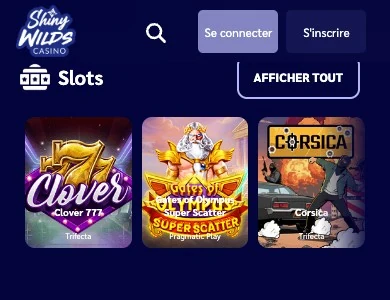
Shiny Wilds Casino can be played straight from the browser on a smartphone or a tablet. You get the same account, the same games and the same cashier as on computer, with no file to install.
Which format for mobile play?
We offer a web version adapted to mobile screens. It works on recent smartphones, tablets and desktop computers. Your account syncs from one device to another: you start a session on computer and pick it up on your phone with the same credentials. The web version of the site is the one you are viewing.
A shortcut on your home screen
To reach the site in one tap, add an icon to your home screen from your browser menu. The icon opens Shiny Wilds Casino directly, just like an app.
Features available on mobile
The mobile version includes the account features. You will find:
- registration with email, full name, date of birth and address;
- deposits by Apple Pay, Google Pay, Visa, Mastercard, Revolut, MiFinity or cryptocurrency;
- withdrawal requests from the cashier;
- the My bonuses section to choose the games for your free spins;
- the My limits section to set your deposit caps;
- the account history to view your transactions;
- quick search and your favourite games;
- your progress in The Wilds Hunt programme;
- live chat with support.
Mobile or computer: comparison
Both give access to the same account. The differences come down mainly to the screen and mobile payment methods.
| Criterion | Mobile (browser) | Computer |
|---|---|---|
| Access | Smartphone or tablet browser | Web browser |
| Installation | None, shortcut possible | No client to download |
| Account | Same account, synced | Same account, synced |
| Games | Catalogue of more than 5,000 games | Catalogue of more than 5,000 games |
| Payments | Apple Pay and Google Pay on compatible devices, cards, crypto | Cards, e-wallets, crypto |
| Support | Live chat and email | Live chat and email |
Adding Shiny Wilds Casino on Android
On Android, you create the shortcut from the browser in a few taps.
- Open your smartphone's browser, for example Chrome.
- Go to the Shiny Wilds Casino site.
- Open the browser menu.
- Choose the add to home screen option.
- Confirm: the icon appears among your apps.
Adding Shiny Wilds Casino on iPhone and iPad
On iOS, you do it through Safari.
- Open Safari on your iPhone or iPad.
- Go to the Shiny Wilds Casino site.
- Tap the Share button.
- Select Add to Home Screen.
- Confirm with Add.
Compatibility
The site is designed to be accessible from practically any recent device.
| Device | Compatibility |
|---|---|
| Recent smartphones | Yes, via the mobile browser |
| Tablets | Yes, via the browser |
| Desktop computers | Yes, via the web browser |
| Connection | Internet access required |
Games on mobile
The mobile catalogue follows the site's categories. Slots and live tables launch on the touchscreen.
| Category | Providers or examples |
|---|---|
| Slots | Pragmatic Play, Hacksaw Gaming, Nolimit City, Trifecta |
| Live casino | Evolution Gaming, Pragmatic Play Live |
| Table games | Roulette, blackjack, baccarat, poker |
| Jackpot games | Progressive jackpot slots |
Demo mode also works on mobile for the games that offer it; live casino is played for real money. The list of games is on the Games page.
Account security on mobile
The security rules are the same on every device. They protect your account and your funds:
- identity verification (KYC) before any withdrawal;
- transactions monitored against money laundering;
- player funds held in separate client accounts or crypto wallets;
- deposits and withdrawals only via payment methods in your name;
- one account per player, with no shared access.
Updates and troubleshooting
The browser version needs no manual update: each visit loads the live version of the site.
Common problems
If the display is wrong or a page freezes, a few simple steps fix most situations:
- reload the page;
- update your browser;
- check your internet connection;
- contact support by chat or at support@shinywilds.com if the issue persists.
Mobile version FAQ
Do I need to download a file to play on mobile?
No. Shiny Wilds Casino opens in the browser; an icon on your home screen is enough to come back to it.
Does my account stay the same on mobile and computer?
Yes. The account is synced across all your devices, with your favourites, bonuses and history.
Can I deposit with Apple Pay or Google Pay?
Yes, on a compatible device, from €20. The other methods are listed on the Payments page.
Are the live tables available on mobile?
Yes, Evolution Gaming and Pragmatic Play Live tables launch from the mobile browser.
Are the responsible gambling tools available on mobile?
Yes. The My limits section and the self-exclusion options are managed from your account, whatever the device.
Adults only. Gambling carries a financial risk: set yourself limits and take breaks.